Think about the day you set up your office or shop. You chose the signboard with care. You decided where the front desk goes, what hangs on the walls and who greets people at
the door.
Nothing in that space is there by accident. The signboard tells people who you are, the
front desk helps them, and the certificates on the wall tell them they can trust you.
Now open your website. For many customers, this is where they walk in first, before they
visit, call or send a WhatsApp message. Yet too many business websites cover their walls
with pictures chosen only because they looked nice.
Now open your website. For many customers, this is where they walk in first, before they
visit, call or send a WhatsApp message. Yet too many business websites cover their walls
with pictures chosen only because they looked nice.
Every image, line and button on it shoulddo a job, just like everything in your real office does.
Many business websites aren’t badly built. They’re built as decoration.
You know the look:
It looks finished, and it may even look beautiful. But ask what a customer actually learns
from it, and the honest answer is usually nothing.
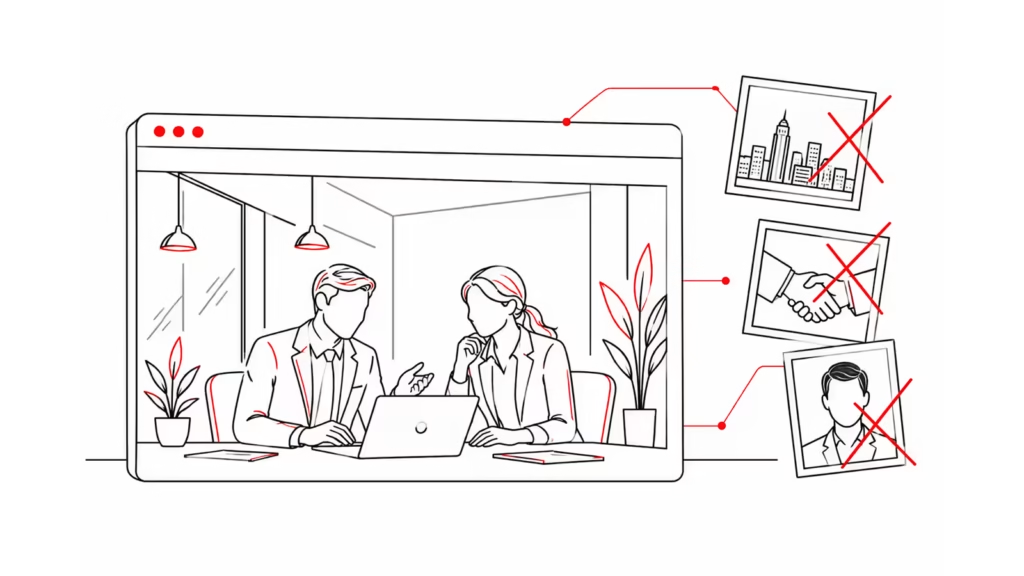
The Burj Khalifa is stunning. It just isn’t yours.
Now picture your office: a stranger’s family photo in reception, a skyline poster behind the
front desk and no sign of your team. You would never do that. Online, it happens every
day.
Your Office vs Your Website
Everything in a well-run office has a job, and each one has a match on your website.
Nobody plans an office by asking only what would look nice on the walls. They ask what a
customer needs when they walk in. Your website deserves the same question.
Every Image Needs a Job
Before an image goes on your website, it should do at least one of four jobs:
Then run a simple test. Remove the image and ask what the customer lost. If the answer is
nothing, it was decoration.
Here’s what that looks like in practice:
Laundry: your pressing station, your delivery van at a customer’s building and a beforeand-after of a stain you removed beat a model holding fresh towels.
Accounting firm: photos of the team who will actually handle a client’s books beat a
handshake over a calculator
Interior design: rooms you actually finished beat a perfect stock living room that
anyone can download.
Movers: your crew, your trucks and your packing materials beat smiling models
carrying empty boxes.
This doesn’t mean every stock image is wrong. A simple illustration of your three-step
process is doing a job. A stranger smiling at the camera isn’t.
Decoration isn’t free, either. Every heavy image makes the page slower, and a slow page is
a door that’s hard to open.
No real photos yet? A clean page with clear words beats a beautiful page full of strangers.
When you can, book a half-day shoot of your place, team and work.
Ads Are Your Rent
Anyone who has rented a shop or office in the UAE knows what a good location costs. You
pay that rent so customers walk through your door. Online, your ad budget does the same
job.
Every click on your Google or Meta ad is a person at your door. A slow page makes them
leave before the door opens. A page full of stock photos with no clear next step is a shop
with nobody at the counter.
A clear website also brings better leads. When your prices, service areas and process are
on the page, the people who message you already know what you offer. Your team spends
less time on chats that go nowhere and more on real customers
The 2-Minute Walk-InTest
Take out your phone and open your website as if you’ve never seen it. Walk through it the
way a new customer walks into your office, and answer each question honestly.
Every “no” is a customer walking out. Fix the door and the front desk first: they decide
whether people come in, and whether they can reach you.
Final Thoughts
In a good office, everything does a job: it helps customers find you, trust you and buy from
you. Your website should work the same way.
Before you add anything to your website, ask the question you’d ask in your office. Does
this help the customer, or does it just fill the wall?
Not sure how your website would score?
Book a 15-minute call with The Next Chapter.
We’ll run the walk-in test on your site with you and show you what to fix first.